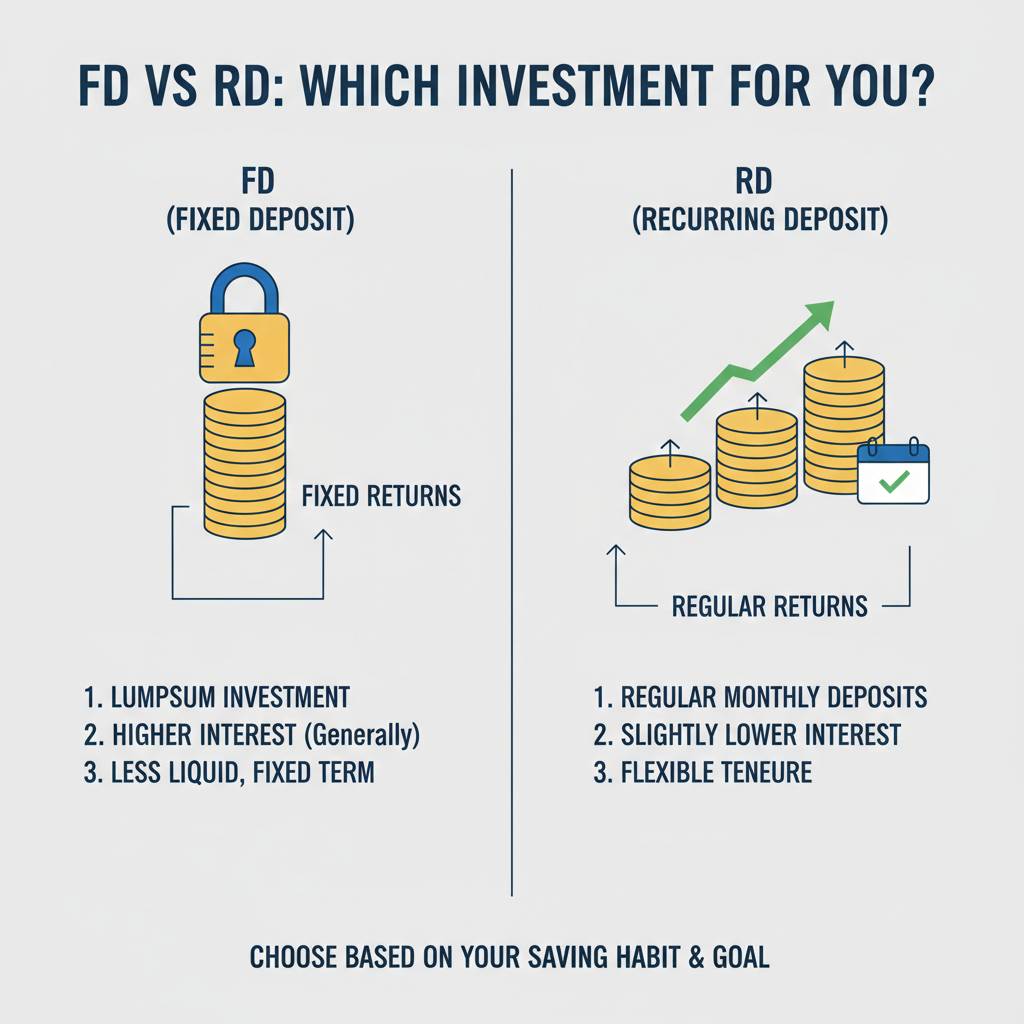
So you’ve finally parked some cash in a Fixed Deposit or started a Recurring Deposit, feeling pretty responsible. You log in to your bank app, see the interest number, and think, "Great, I’m making money." That’s exactly where I got stuck for years.
My big mistake? I never dug past that top-line number. I’d see "Maturity Amount: ₹1,10,000" on my ₹1 lakh FD and just file it away mentally as "profit." I had no real understanding of what I was actually earning after tax and inflation, or if I could have structured things better. I was confusing the final number with the real return. It was like buying something on sale without checking the original price—a feel-good move that costs you.
The turning point was when I used one of those slick online FD/RD calculators to plan a goal. It spat out a big, tempting figure. I almost locked in my money for five years based on it. Thankfully, a friend who’s an accountant asked me two simple questions: "Is that pre-tax or post-tax?" and "What’s the compounding frequency?" I just stared blankly. I had no idea the calculator’s default was showing me the pre-tax amount, and that "annual compounding" and "quarterly compounding" on the same interest rate give different results. I was about to make a decision based on a number that wasn’t real.
That’s the problem with just trusting the shiny calculator output. It’s a fantastic tool, but it’s dumb. It will give you exactly what you ask for, even if you’re asking the wrong questions. Your job is to know what to ask.
What Online Calculators Are Really Showing You (And What They Hide)
Let’s break down the report a good calculator gives you, line by line, with the stuff you need to watch for.
1. The Interest Rate: The "Sticker Price"
This is the advertised rate. Your first trap is assuming this is what you’ll pocket. It’s not. This is the annual nominal rate. The real magic (or tragedy) happens in the fine print below it.
2. Compounding Frequency: The Secret Engine
This is the one I missed. How often your interest is calculated and added back to the principal changes everything.
- Quarterly Compounding: This is standard for most bank FDs. The annual rate is divided by four, and applied every three months. Each quarter, you earn interest on a slightly larger amount.
- Annual Compounding: Interest is calculated once a year. It’s simpler but yields less than quarterly for the same rate.
Here’s the kicker: A 7% rate with quarterly compounding gives you a higher actual return than 7% with annual compounding. Good calculators will show you the "Annual Effective Yield" or something similar. That is the more truthful number. If your calculator doesn’t show this, you’re only seeing half the picture.
3. The Maturity Amount: The Big, Seductive Number
This is the grand total (Principal + Interest) you’ll get at the end. It’s designed to make you feel good. DO NOT STOP HERE. This is the pre-tax, pre-inflation fantasy figure. It is not your "profit."
4. The Total Interest Earned: A Closer Look
This is your supposed "profit." But you haven’t paid the taxman yet. For FDs, the interest you earn each year is added to your income and taxed at your slab rate. So, if you’re in the 30% slab, almost a third of that "interest earned" figure vanishes. RD interest is taxed differently—the entire interest is taxed in the final year—but it’s still fully taxable.
This is where online tools often fail. Very few FD/RD calculators have a built-in, accurate tax slider. You have to do this math separately. Take the "Annual Interest" line from your calculator’s detailed breakup, apply your tax rate, and weep a little. The number that remains is your real, take-home interest.
The One Report You Must Generate (That Most People Don't)
Everyone runs the "Maturity Report." The savvy investor runs the "What-If I Break It Early" Report.
Life happens. You might need that money before the term ends. The penalty for breaking an FD early isn’t just a lower interest rate (like 1-2% less). Most banks use a brutal method: they pay you interest for the period it was held at the rate applicable for that period, not your original rate. So your 5-year FD broken at 1 year might earn the pathetic 1-year FD rate on the entire amount. The loss can be huge.
Before you click "confirm," do this: Use the same calculator. Input your amount. Set the tenure to 1 year, 2 years, etc., and note the maturity amount for those shorter periods. Compare it to what your long-term FD would give you if broken at that time (your principal + pathetic penalty interest). The difference is your risk cost. It makes you think twice about locking away money you might need.
Actionable Takeaways: What to Check Before You Lock Your Money
- Chase the Effective Annual Yield, Not the Sticker Rate. If the calculator has an option, always check the "effective yield" for quarterly vs. annual compounding. That’s your true rate before tax.
- Run the Tax Calculation Manually. Immediately after you get the calculator’s result, open a notes app. Take the annual interest it projects, multiply by your income tax slab rate. Subtract that from the total interest earned. That’s your actual gain.
- Test the Breakage Scenario. Seriously. Run the calculation for 1/3rd and 1/2 of your FD’s tenure. See what you’d get if you completed a shorter FD instead. The gap shows the true liquidity cost.
- For RDs, the "Final Interest" Figure is a Tax Trap. Remember, the entire interest from an RD is taxed in the year it matures. This can sometimes push you into a higher tax slab for that year if you’re on the edge. Plan for that tax liability.
- The Biggest Mistake I See: People using the maturity amount to plan a future expense without accounting for tax. You think you’ll have ₹1.5 lakh for a vacation, but after tax, it’s ₹1.3 lakh. That’s a painful budget shortfall.
These tools are powerful, but they’re just calculators, not financial planners. They give you raw data, not wisdom. The wisdom is in knowing that the most important number—your post-tax, inflation-adjusted return—is the one you usually have to figure out yourself. It’s a bit of work, but it beats the slow, quiet disappointment of realizing your "smart" investment didn’t really earn what you thought it did.
*Please consult with a financial advisor for personalized advice. This is just what I learned from my own trial and error.*